Price terms as published
Each line is the vendor’s own wording, split from the price capture checked on 2026-09-22. Nothing here is rounded, converted or re-worded — the full sentences stay in the review below. Lines that carry only a price continue the plan named on the line above, in the vendor’s own order.
| # | Plan / term | Checked |
|---|---|---|
| 1 | Free (open source, MIT) | 2026-09-22 |
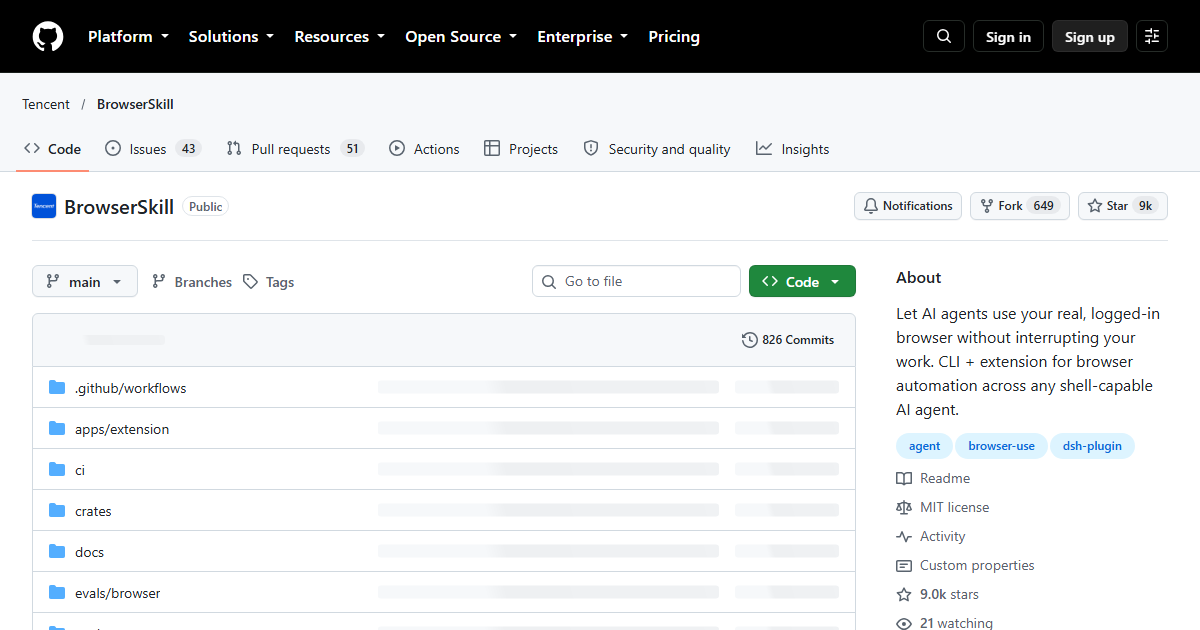
One-liner: BrowserSkill (bsk) connects AI coding agents to the browser
you’re already using — real cookies, real sessions — through a CLI plus a
browser extension, so agents browse authenticated sites without interrupting
your work.
Verified facts (GitHub API + raw README, 2026-09-22 00:26–00:40 UTC+8)
| Attribute | Value | Source |
|---|---|---|
| GitHub stars | 6,289 (455 forks, 60 open issues+PRs) | Tencent/BrowserSkill via GitHub API, 2026-09-22 |
| License | MIT | GitHub API license field |
| Language | TypeScript | GitHub API |
| Created | 2026-06-22 | GitHub API |
| Last push (at the 2026-09-22 check) | 2026-09-21 | GitHub API |
| Host agents (README line 15-16, verbatim) | “Cursor, Claude Code, Codex, OpenClaw, CodeBuddy, WorkBuddy, Pi, Hermes Agent, DeepSeek Harness, and other AI agents” | raw README |
| Hermes link | harness badge links NousResearch/hermes-agent | README harness table |
| Install command | bsk install-skill --harness cursor (per-harness skill install, --source, --force supported) |
README |
Hermes Agent appears twice in the README — once in the intro’s supported-agent list and once in the harness badge table.
The catches
- Your real session is the blast radius. Anything the agent does in the browser happens as you, logged into everything. Review skill instructions before granting.
- Extension + CLI pairing means updates can break in two places; project is ~3 months old.
- Huge harness list ≠ equal support. Some integrations are thin skill files; test yours.
Who should use it
Agents that need Gmail/Notion/internal-portal state without credential juggling — research bots, QA flows, personal-automation users on Hermes Agent or Codex who want their logged-in Chrome doing the browsing.
Stars, dates, license from GitHub API; harness quotes and commands from raw README, both fetched 2026-09-22. No browser-session hands-on was performed for this page; no hands-on claims are made.
Repository facts (GitHub API + raw README, checked 2026-10-16)
| Attribute | Value |
|---|---|
| Stars / forks | 8,997 / 649 |
| Open issues | 94 |
| Licence | MIT |
| Primary language | TypeScript |
| Repository created | 2026-06-22 |
Last push to main |
2026-10-15 |
| Archived | No |
| GitHub topics | agent, browser-use, dsh-plugin |
The repository is roughly four months old and was pushed on 2026-10-15, so the cadence is active rather than dormant. Star count is a popularity signal only — it says nothing about whether the tool is safe on a machine where you keep banking sessions, which is the real decision here.
What the README documents in practice
The README is organised around capabilities rather than marketing claims, and the capability table is worth reading before installing: the agent works with the login state already in your browser, tasks run in a separate visible Agent Window (an existing tab can be borrowed and is returned when the task ends), and you can read page text and controls, click, type, manage tabs, take viewport or full-page screenshots, and upload or download files in local mode.
Three further rows are the ones that matter for reviewers of this site’s hands-off policy:
- Debugging with evidence — actions are tied to requests, response bodies, console messages and page changes; explicit HTTP rules and request replay let you test a hypothesis instead of guessing.
- Browser and profile selection — you can name browser instances, bind a task to a specific profile, or pair a server-side agent with a browser on your own machine.
- Review of what happened — browser-local debugging history can be reopened, exported as JSON, or a separate operation audit enabled.
Structured extraction is also documented: loaded tables and lists export to JSON/CSV with column names, page and frame sources, merged-cell metadata and explicit coverage.
Setup path and its gotchas
Setup is four steps in the README: install the bsk CLI, connect the extension, install the
skill for your agent, then run bsk doctor and confirm the extension shows Connected. The
README is explicit that a passing doctor check alone does not prove the agent can discover
the skill — you still need to start a new agent session and check discovery there.
Supported agents listed in the README include Cursor, Claude Code, Codex, OpenClaw, CodeBuddy,
WorkBuddy, Pi and Hermes Agent; DeepSeek Harness has a dedicated plugin exposing native
bsk_* tools and browser task previews (renamed from browser_* in 0.3.3, with no aliases kept).
Sessions are started with bsk session start --json, driven with bsk navigate / bsk observe /
bsk screenshot, and must be stopped explicitly — the README tells you to stop the session even
after a failed task so borrowed tabs are returned.
Two limitations are stated by the project itself rather than discovered here: Chrome’s public
extension APIs cannot guarantee zero transient window activation or focus restore, and hosts that
reap command children need an explicit daemon setup (bsk daemon start --foreground) documented
in a separate host-setup guide. Both are worth reading if the agent runs unattended.