Price terms as published
Each line is the vendor’s own wording, split from the price capture checked on 2026-09-21. Nothing here is rounded, converted or re-worded — the full sentences stay in the review below. Lines that carry only a price continue the plan named on the line above, in the vendor’s own order.
| # | Plan / term | Checked |
|---|---|---|
| 1 | Free (open source, MIT) | 2026-09-21 |
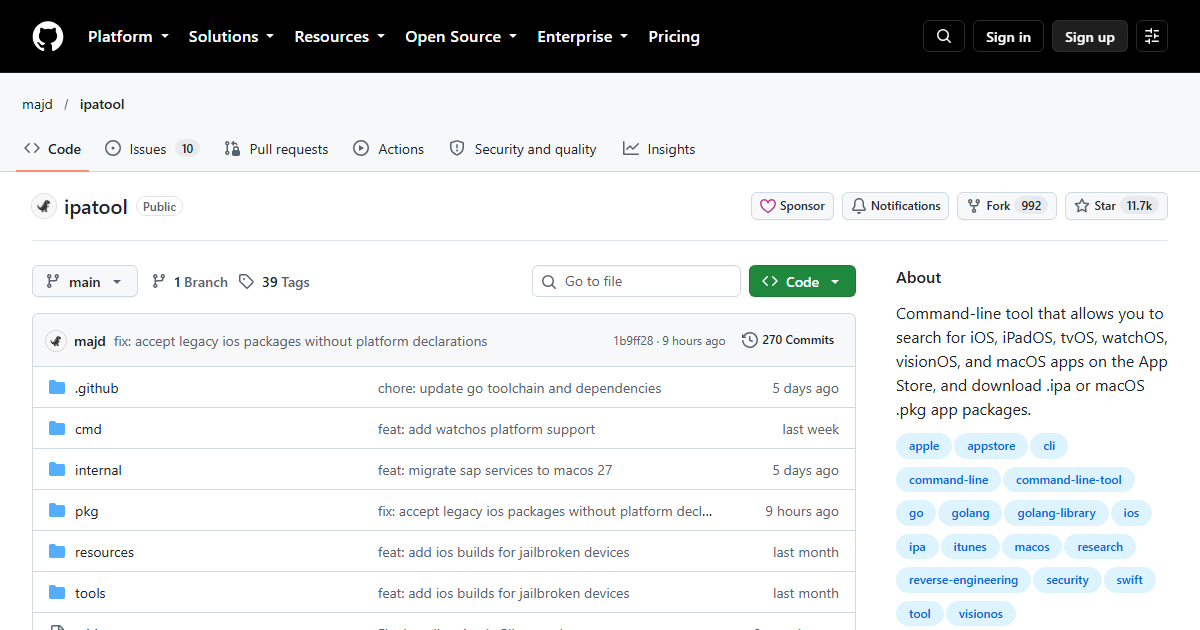
One-liner: ipatool is a command-line tool that lets you search for apps on
the App Store (iOS, iPadOS, tvOS, visionOS, macOS) and download .ipa or
macOS .pkg packages directly — no Xcode “grab the build” dance, no third
party store.
Verified facts (as of 2026-09-21)
| Attribute | Value | Source |
|---|---|---|
| GitHub stars | 11,333 | repo page snapshot, 2026-09-21 |
| Forks | 944 | repo page snapshot |
| License | MIT | repo license field (spdxId on page) |
| Last commit | 2026-09-19 | commits feed |
| Repo description | “Command-line tool that allows you to search for iOS, iPadOS, tvOS, visionOS, and macOS apps on the App Store, and download .ipa or macOS .pkg app packages.” | repo page description |
| Commands | auth, search, list (purchased history), download |
README command table |
| Cross-platform | Runs on Windows, Linux, and macOS (host side) | repo README |
| Install | Homebrew (brew install ipatool) |
repo README |
What you actually need
An Apple ID that can legitimately access the app — the tool authenticates against App Store services as you (including two-factor prompts), and downloads are the same ones your device would make. Packages come down encrypted/FairPlay-wrapped like any App Store download: this archives and inspects distribution, it does not crack DRM, and the README’s own positioning is archiving, compatibility testing, and security research.
The catches
- A usable Apple ID is a hard dependency, with whatever account-level consequences (rate limits, review, lockout) that implies. Use an account you’re allowed to use this way; downloading paid apps via a shared account for resale or team piracy is outside the intended scope.
- Encrypted payloads only.
.ipacontents are FairPlay-protected, so deep static analysis still needs a device-side path or your own builds. - Store API fragility. Everything rides Apple’s undocumented store endpoints — expect breakage after Apple changes and quick upstream fixes; the repo’s activity here is reassuring (commit this month).
Who should use it
Mobile QA teams pinning historical versions for regression testing, researchers cataloguing App Store distribution, and developers recovering their own purchased apps for legitimate archival. Anyone intending to install downloaded IPAs outside Apple’s controls should re-read the license and terms first.
Stats, license, command surface, and description verified against primary sources (GitHub repo page, raw README, commits feed) on 2026-09-21. No App Store download was executed for this page; no hands-on claims are made.
Repository facts (GitHub API + raw README, checked 2026-10-16)
| Attribute | Value |
|---|---|
| Stars / forks | 11,715 / 992 |
| Open issues | 10 |
| Licence | MIT |
| Primary language | Go |
| Repository created | 2021-05-22 |
| Last push | 2026-10-15 |
| Archived | No |
| Topics | apple, appstore, cli, ios, ipa, itunes, macos, reverse-engineering, security, visionos |
Five years old, MIT, Go, and only ten open issues — an unusually quiet issue tracker for a tool with
this much reach, and the strongest single signal in this table. The topics also tell you the
audience: security and reverse-engineering sit next to cli and ios, i.e. researchers and
platform engineers rather than end users.
What it does, and how you get it
The README states it plainly: ipatool searches the App Store for iOS, iPadOS, tvOS, watchOS,
visionOS and macOS apps and downloads .ipa or .pkg packages from the command line. Not an app
installer — a downloader and unpacker for packages you are entitled to.
Install routes: GitHub releases for Linux and Windows, Homebrew on macOS
(brew install ipatool). Usage starts at ipatool --help, which lists the command surface:
auth, download, plus completion generation — a small, conventional CLI rather than a framework.
The two requirements that decide everything
The README’s Requirements section is two lines long and both matter:
- A supported operating system — macOS, Linux, Windows or iOS.
- An Apple Account already configured to use the App Store.
That second line is the whole risk profile. ipatool authenticates as you against Apple’s store
(auth is a top-level command for exactly this reason), which means the account you point it at is
the account whose behaviour — from Apple’s perspective — is indistinguishable from an odd but
legitimate client. If you keep purchases, subscriptions or family sharing on that account, use a
dedicated one instead.
The MCP section, and what it changes
The README includes an MCP tools section — the CLI can be exposed to agents through the Model Context Protocol, which converts “download this app version and diff the bundle” from a manual sequence into something an agent can run. It also has a Compiling section for building from source, and licenses under MIT with a GitHub Sponsors link.
What to verify before using it at work
- Terms, not just technology. Downloading packages for apps you are entitled to is one thing; redistribution or automated mass extraction is another. Read Apple’s terms and your own security policy before wiring this into a pipeline, and keep it to research or QA use.
- Version pinning matters for reproducibility. An App Store client returns today’s package, not the version you tested last month — decide how you record which build you analysed.
- Credentials hygiene. If
authstores session material on disk, check where, and rotate the Apple ID password any time a machine that ran it is repurposed.
Source note: repository statistics come from the GitHub API; requirements, install routes, command list and the MCP/Compiling sections come from the raw README, both read 2026-10-16. We did not authenticate to the App Store or download any package for this entry.