Price terms as published
Each line is the vendor’s own wording, split from the price capture checked on 2026-10-18. Nothing here is rounded, converted or re-worded — the full sentences stay in the review below. Lines that carry only a price continue the plan named on the line above, in the vendor’s own order.
| # | Plan / term | Checked |
|---|---|---|
| 1 | No paid tier or pricing page published — a single-purpose status page whose only numbers are its own cost counter, not a product price (checked 2026-10-18) | 2026-10-18 |
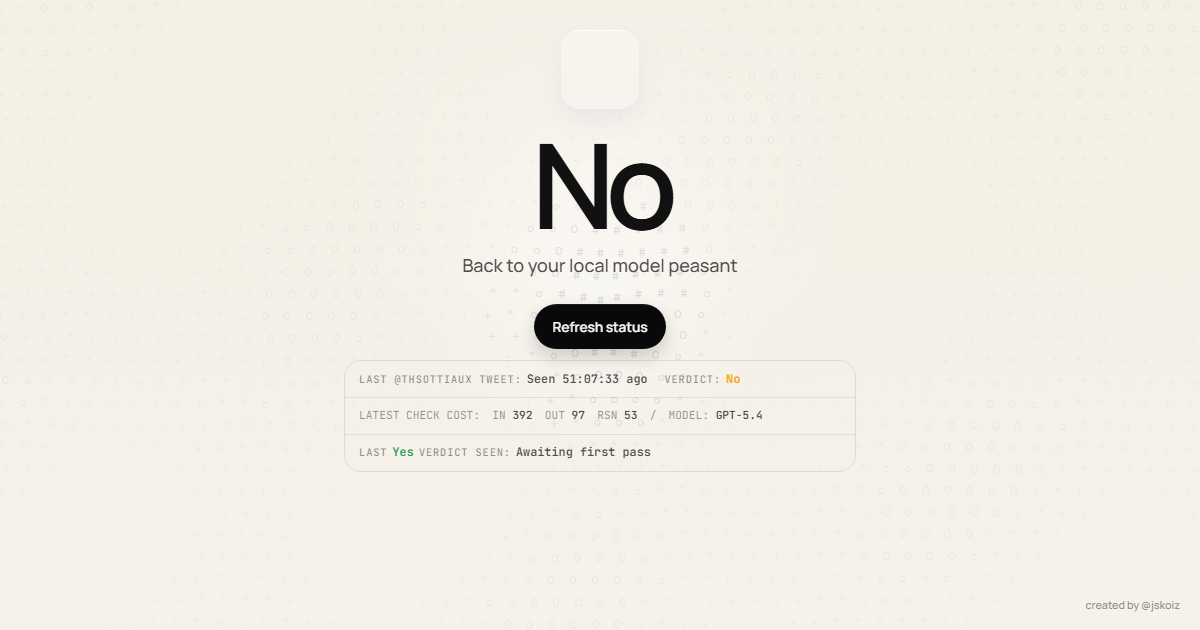
One-liner: hascodexratelimitreset.today is a single-purpose page that states whether OpenAI’s Codex global usage limit has been reset today.
Verified facts (checked 2026-09-28, official site)
| Attribute | Value | Source |
|---|---|---|
| Purpose | Yes/no verdict on whether Codex reset today | hascodexratelimitreset.today (official), checked 2026-09-28 |
| Signal source | Posts by OpenAI’s Thibault Sottiaux (@thsottiaux) on X | hascodexratelimitreset.today (official), checked 2026-09-28 |
| Display | Live status, a refresh action, the last tracked post, and the last “Yes” verdict | hascodexratelimitreset.today (official), checked 2026-09-28 |
| Classification | New posts are scored automatically; a reasoning/verdict block is shown | hascodexratelimitreset.today (official), checked 2026-09-28 |
| Relation to account usage | None — it tracks global reset announcements, not your personal allowance | hascodexratelimitreset.today (official), checked 2026-09-28 |
| Creator | @jskoiz (linked on the page) | hascodexratelimitreset.today (official), checked 2026-09-28 |
How it differs from other trackers
It answers one question — “did it reset today?” — rather than keeping a full history or reading local session files. It is the lightweight, glanceable version of a reset tracker.
Who it is for
Codex users who only want the current global reset answer without a log, a dashboard or an install.
This page is compiled from official-site information only; it is not a hands-on test.
What the page showed on 2026-10-16
Live text read from the page during this check, in the order it appears:
| Element on the page | What it said at check time |
|---|---|
| Headline verdict | a single word — No |
| Sub-line | “Back to your local model peasant” (the site’s own phrasing) |
| Refresh control | a “Refresh status” action, plus a “Fetching live status” state while it polls |
| Last tracked post | “Last @thsottiaux tweet seen” with an age in H:MM:SS form |
Last Yes verdict |
shown separately, with an “Awaiting first pass” state when nothing has been classified yet |
| Check cost line | token counts for the last check — IN 392 / OUT 97 / RSN 53 — and the model label GPT-5.4 |
| Credit | “created by @jskoiz” |
The token and model line is unusually transparent for a status page: it shows you that every refresh costs somebody an LLM call, and which model did the scoring.
How the mechanism works, in plain terms
The page does not log into your OpenAI account and does not read your allowance. It watches posts
by OpenAI’s Thibault Sottiaux (@thsottiaux) on X, scores newly seen posts with a model, and
prints the resulting verdict. That design has two consequences worth understanding:
- It tracks a global signal, not your account. A
Yesmeans an official reset announcement was seen; it does not mean the reset applies to your plan, your region or your session. - The verdict can be stale by construction. The page tells you how old the last tracked post is, and that age is the number to read first. If the last-seen counter is old, the verdict above it is describing an older world than the one you are in.
How to read a No without over-reading it
A No verdict answers exactly one question: has the tracker seen a fresh reset signal today?
It is not a prediction about your next hour of usage, and the site does not present it as one —
the classification block explicitly shows states like “Monitoring” and “No classification yet”
while it waits for posts it can score.
The practical workflow this page supports: refresh, check the age of the last tracked post first, read the verdict second, and treat your own account’s quota page as the authority whenever the two disagree. Because the page is a single-purpose status display with no history archive of its own, anything you want to keep — screenshots, timestamps — has to be captured by you at the time you look.
Limits worth knowing
There is no history archive, no export and no public API on this page, so it cannot answer questions like “how often did resets land in the last month” — you would have to keep your own log. The tracker also has no account settings: it does not know which plan you are on, how much you have used, or which model you are waiting for, and it will not warn you when a reset does arrive. Its data source is a third-party social feed, so a quiet day on that feed looks identical to a day without a reset, and the page’s own “monitoring” state exists precisely to make that ambiguity visible instead of guessing. Treat it as a cheap early signal to check your OpenAI quota page, not as a substitute for it.